Showing posts with label microsoft. Show all posts
Showing posts with label microsoft. Show all posts
Tuesday, September 30, 2014
Microsoft is Gonna Acquire NOKIA !!!

Only a few years ago, NOKIA was the number one cell phone manufacturer. But current situation is really frustrating. Due to the growing competition in the market, lack of innovation, changing nature of the people, Nokias Market Share is now at the bottom. In this situation, Microsoft has agreed to purchase the business of Nokia.
The boards of directors of Nokia and Microsoft have decided to enter into a transaction. Microsoft will purchase all of Nokias Devices & Services business, patents, license and mapping services.
Nokia will get € 3.79 billion (Equivalent to $ 4.98 billion) for its Devices & Services business. And € 1.65 billion (Equivalent to $ 2.17 billion) will be paid by Microsoft to license Nokias patents. That means, Microsoft is to pay € 5.44 billion ($ 7.14 billion) in cash to buy Nokia. Microsoft will draw upon its overseas cash resources to fund the transaction. The transaction will be made in the first quarter of 2014 and subject to shareholders and regulators approval.
Stephen Elop, the CEO of Nokia, is expected to join Microsoft with Jo Harlow, Juha Putkiranta, Timo Toikkanen and Chris Weber at the closing of the transaction. At closing, 32,000 people are expected to be transferred to Microsoft, including 4,700 in Finland and 18,300 employees directly involved in manufacturing, assembly and packaging worldwide.
Win-Win Situation for All
This transaction will generate a win-win situation for employees, shareholders and consumers of both companies.
Nokias Benefit
Nokia has a very little chance to recover its reputation and position in the market. Its almost out of competition. Innovative devices from Samsung and Apple will hardly allow Nokias products to compete in the market. But Lumia, operated by Windows 8 OS, has a chance to compete with Apple and Samsung Devices. When Microsoft will acquire all of Nokias Smart Phones including Lumia, definitely the devices will be much improved. Thus it could be a good come back for Nokia.
Microsofts Benefit
Two decades ago, Apple was beaten by Microsoft in Personal Computer Business. Due to the huge popularity of Windows, Apple Computers were not preferred by the users. But the scenario has changed with the passage of time.
Now people like mobile devices like cell phones and tablets. Most of the PC users are no longer interested to purchase desktop PCs. They are switching to Samsungs Galaxy Tabs and Apples i Pads Consequently the sale of Windows OS falls dramatically. Microsofts new OS, Windows 8, was not sold as expected.
To retain market share, Microsoft should focus on mobile devices. Following this theory, Microsoft has introduced its first tablet device - Surface. Earlier, Microsoft also produces Windows phones but they were not successful.

When Microsoft failed with Mobile Devices again and again, it decides to purchase Nokia.
Good News for the Fans
This is a good news for the fans of both companies. Because Nokia lovers will get more innovative products. And Microsoft users will get better mobile devices. And I personally believe, Microsoft and Nokia together, will produce good devices and provide better services to the valued customers.
This transaction is considered as a business strategy for both companies. Both companies have a chance to come back in the market. As the PC market is down, Microsoft must grab the tablet market. And due to the huge competition and changing tastes of the people, Nokia must go for the innovation. So, there is no alternative to change. This acquisition is the demand of time.
What next? Wait and see - what the two do next . . .
This transaction is considered as a business strategy for both companies. Both companies have a chance to come back in the market. As the PC market is down, Microsoft must grab the tablet market. And due to the huge competition and changing tastes of the people, Nokia must go for the innovation. So, there is no alternative to change. This acquisition is the demand of time.
What next? Wait and see - what the two do next . . .
Stay with Marks PC Solution to get more interesting IT topics!

Sunday, September 28, 2014
Age Calculator by Microsoft Excel !!

Often you may need to calculate your age. Or someone may ask you to calculate his/ her date. And sometimes you may need to calculate the difference between two dates. There are many third party tools (small software) to calculate the difference between the two days.
If youre using Windows 7/ 8 then you dont need any other tool to calculate the difference between two dates. Because Windows 7 and 8 has a nice calculator. It allows you to calculate age or date difference.
To calculate a date using Windows 7/8 calculator-
- Press Start + R > type calc > hit Enter.
- Now go to the View menu and choose Date Calculation.
- Now enter the From date and To date and hit on Calculate button.
Read More Here . . .
But my todays discussion is not this one. Today Im gonna show you how to calculate the age or the difference between two dates using Microsoft Excel! You just need to download a file and then open it. Download the file from the link below:
This is a zip folder. After downloading the folder, first you need to unzip it. There are 3 files:
- A Read Me file
- An xls file for Office 97-2003 users
- An xlsx file for Office 2007 and 10 users
Open the file that is compatible with your version of Microsoft Excel. After opening the file you will see some text as showing in the image above. Now do the following:
- Input current date in the day, month and year column.
- Input your birth date or the date from where you want to calculate in the day, month and year column.
- Now you get the difference or your age in the Age row.
Remember: Formulas used in this file for calculation are hidden. Never try to change it unless youre capable. If you make any mistake then it will not show you the correct result. If you wanna change the formulas, first you have to keep a back up copy of the file.
Hopefully this file will be very useful for you. If you wanna know about something or expect something from us, just leave a comment with your feedback/ opinion.
Thanks for visiting Marks PC Solution . . .
Stay with Marks PC Solution to get more interesting IT topics!
Microsoft Office WebApps vs Google Docs
A student would like to create a simple document and share it with his classmates.
How can such task be done? Well, easiest and most used way is to create a document on local computer with Microsoft Word and just email it to classmates. This approach has worked since inception of email and Word 97. But lets remember that its 2013 and there must be a better way.
Essentially, there are two major free solutions available in the market: Microsoft Office WebApps and Google Docs. Lets compare them face to face.
We will analyze a work flow of creating and sharing a Word document in with Microsoft and Google solutions.
Lets take a look at Microsoft Web Apps first.
How do we start?
1. We will search for "office web apps" in bing.com
Heres what we get:
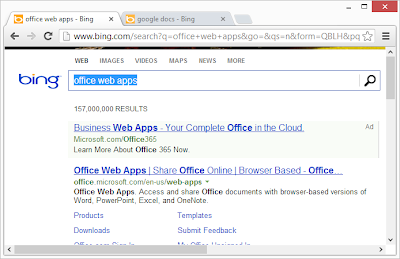
2. Weve got 2 links related to Web Apps. First link is a sponsored "Ad". Lets click there.
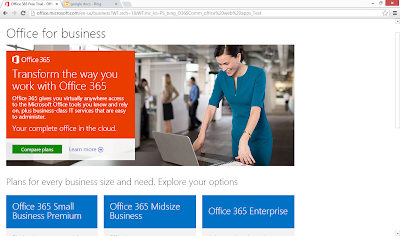
Uhhh, nope, no Web Apps here. This is a page about Office 365, not Office Web Apps. Ok
3. Click "Back" button in your browser to get back to search results
4. Lets click non-sponsored link
http://office.microsoft.com/en-us/web-apps
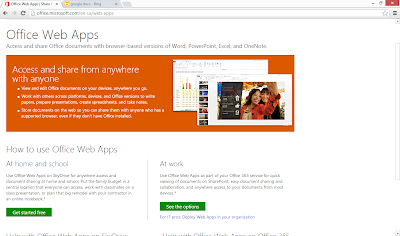
5. Click "Get Started free" Button
It takes you to SkyDrive
https://login.live.com/login.srf?wa=wsignin1.0&rpsnv=11&ct=1362894523&rver=6.2.6289.0&wp=MBI_SSL_SHARED&wreply=https:%2F%2Fskydrive.live.com%2F&lc=1033&id=250206&mkt=en-US&cbcxt=sky
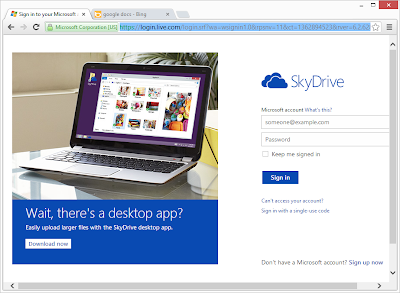
Uhh, why did it take me to SkyDrive? I want to use Office Web Apps?
6. Whatever, lets sign in.
SkyDrive shows me its folders. So, again, I wanted to use Office Web Apps, where are they?
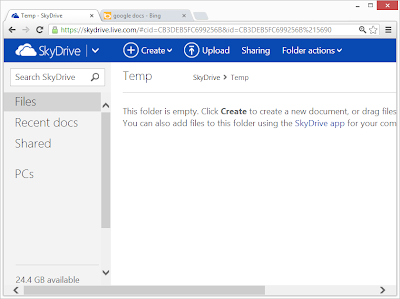
Well, it just so happened, that I actually know how to get to Word WebApp, because Ive done it before, so lets do it.
7. Click Create > Word Document > Create
Word Office WebApp creates it and opens it. Heres how it looks.
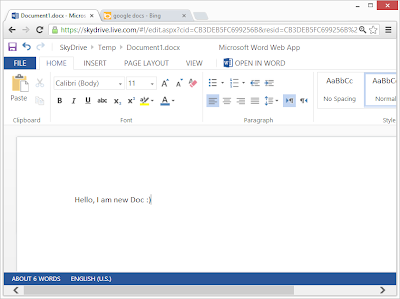
Looks pretty awesome, doesnt it?
Now, how do I share?
File > Share > Share With People > Get a link > Shorten
http://sdrv.ms/12FGcWG
Click Done
Yey, document is shared and you my dear readers can see Word WebApp in action too, just click on link http://sdrv.ms/12FGcWG
Yey, document is shared and you my dear readers can see Word WebApp in action too, just click on link http://sdrv.ms/12FGcWG
Enjoy!!!
Ok, now what about Google Docs?
1. In bing.com type "google docs"
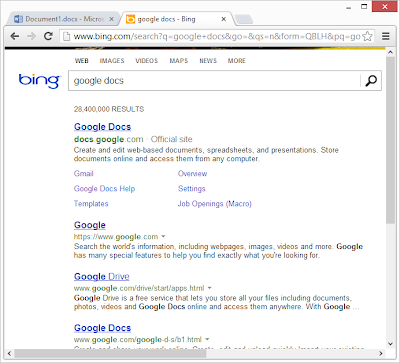
2. Click on 1st link
https://accounts.google.com/ServiceLogin?service=writely&passive=1209600&continue=https://docs.google.com/%23&followup=https://docs.google.com/<mpl=homepage
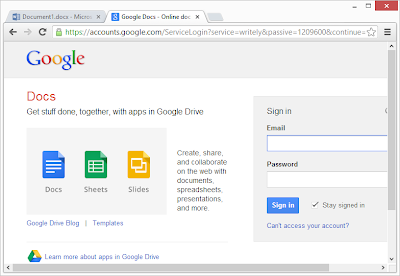 Ok, looks like I am in right place
3. Sign in
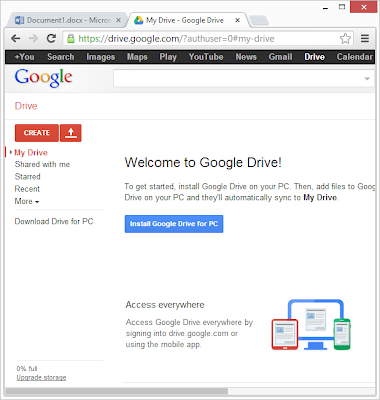
4. There no clear way to get to Google Docs, but there is one red button that attracts attention: Create > Document
Heres how it looks
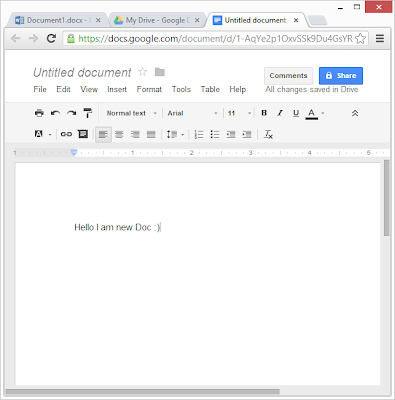
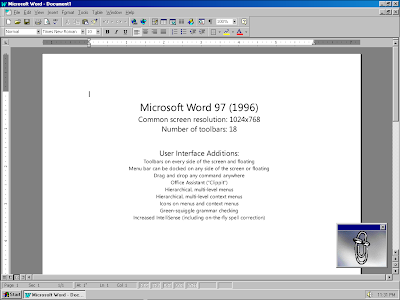
Mheeh, looks like this software was made back in 1990s, not 2013. Just to illustrate my point, heres a screenshot of Word 97 :)
Now, lets look at Google Docs share feature.
Click Share Button
Click Save Button
Click Change Button
Click Anyone with the link
Save
https://docs.google.com/document/d/1-AqYe2p1OxvSSk9Du4GsYRpQnQWAmOA1phw2OiTuV64/edit?usp=sharing
Lets see all our experiences in a table, like real geeks do:
To summarize, Google Docs has great discoverability features and fairly straight-forward document creation workflow. Microsoft Office WebApps needs big improvements in discoverability. Microsoft puts WebApps as 2nd link on search engine results for both Bing.com and Google.com. Really? 2nd link, who would click on it? Cmon.
As far as editing goes, Microsoft Office WebApps just rocks, it looks and feels like Microsoft Word 2013, only free. You content will look good, just the way you want it.
For sharing, both WebApps and Docs have could use some improvements in ease-of-use. I wouldnt enjoy telling my mother over our "tech support" conversations on how to use those "Share" features.
Ok, now what about Google Docs?
1. In bing.com type "google docs"
2. Click on 1st link
https://accounts.google.com/ServiceLogin?service=writely&passive=1209600&continue=https://docs.google.com/%23&followup=https://docs.google.com/<mpl=homepage
3. Sign in
4. There no clear way to get to Google Docs, but there is one red button that attracts attention: Create > Document
Heres how it looks
Mheeh, looks like this software was made back in 1990s, not 2013. Just to illustrate my point, heres a screenshot of Word 97 :)
Now, lets look at Google Docs share feature.
Click Share Button
Click Save Button
Click Change Button
Click Anyone with the link
Save
https://docs.google.com/document/d/1-AqYe2p1OxvSSk9Du4GsYRpQnQWAmOA1phw2OiTuV64/edit?usp=sharing
Lets see all our experiences in a table, like real geeks do:
Microsoft Office WebApps | Google Docs | Winner | |
Price | Free | Free | Both |
Edit document directly inside of browser | Yes | Yes | Both |
Find the right site | 2nd result in Bing User has to sign in to SkyDrive, which has no mention of Office WebApps | 1st result in Bing User signs into Google Docs, very clear | Google Docs |
Create new document | Not clear that you can create a Word Document. SkyDrive resembles Windows Explorer rather than content creation site. | No mention of docs, but there is 1 Red "Create" button | Google Docs, barely |
Edit Document | Word WebApp has nice UI, great formatting options, great looks | Looks pretty rudimentary, more like Word 97 than Word 2013 | Microsoft WebApps |
Share Document | Possible, but fairly complicated http://sdrv.ms/Y3cpje | Possible, but fairly complicated https://docs.google.com/document/d/1-AqYe2p1OxvSSk9Du4GsYRpQnQWAmOA1phw2OiTuV64/edit?usp=sharing | No Winner |
To summarize, Google Docs has great discoverability features and fairly straight-forward document creation workflow. Microsoft Office WebApps needs big improvements in discoverability. Microsoft puts WebApps as 2nd link on search engine results for both Bing.com and Google.com. Really? 2nd link, who would click on it? Cmon.
As far as editing goes, Microsoft Office WebApps just rocks, it looks and feels like Microsoft Word 2013, only free. You content will look good, just the way you want it.
For sharing, both WebApps and Docs have could use some improvements in ease-of-use. I wouldnt enjoy telling my mother over our "tech support" conversations on how to use those "Share" features.
Saturday, September 27, 2014
Microsoft Office Professional Plus 2010
All of us know that Office 2010 is the latest office package released by Microsoft. It looks similar to Office 2007. It seems that there is no such changes for what a person needs to upgrade from 2007 to 2010.
For those people, I wanna say that you are wrong. Office 2010 is a very attractive version of office ever released. It includes many new features and effects that cant be made by Office 2007.

To learn about features and benefits, click here.
To know about system requirements of Office, click here.
To compare among different version of Office, click here.
To download office 2010, click here.
Subscribe to:
Posts (Atom)