Monday, October 27, 2014
Google What is 1 button

 When you browse net and read various articles then you might see the Tweet, Facebook like, Stumble Upon button after the post. But at present time you may see another button with other sharing buttons. This is +1 button.
 The +1 button is nothing but an alternative to Facebook like button. But dont think it just like Facebook like button. It is something more than Facebook like button.
When you +1 something actually youre doing many things. Give a +1 to a post means youre recommending this post on Google Search, Sharing with your friends in your Google + Circle and most importantly youre saving the page in your +1 list.
In order to use the Google +1 button, you must have a Google Account. And the account should be visible to public. If you dont set your profile publicly visible then you will not be able to see and use +1 button.
Sometimes you may wanna save a copy of your favourite web page. But you dont need to do so if you use +1. If you see a +1 button in that web page then just give a +1 and you will find this page in your Google + profile at the +1 list!

Sunday, October 26, 2014
How to Solve an Error “Cannot open Documents The” of MS word
-->
When MS word gets corrupt, it givesseveral types of error while opening it. Error message is depend oncause of corruption. You will receive different type of error messagein different scenario. Here I am providing solution for “Cannotopen "DocumentsThe” error message which you will get,when you try to open MS word file. Along with this error message youmay get few massages which are written below...
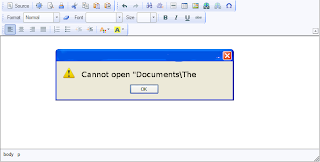
“Cannot open C:My”
“Cannot open "Test.doc"”
Main Cause of the problem: MS wordcorruption is not basic cause of this type of error. The main causeof this problem is registration of your MS word version is get expireand you need to re-register to fix this problem. The process ofre-registering is very easy and you can perform it very easily.
You can use bellow written method on MSword 97 and above version
- Boot your system.
- Click on Start --> Run
- When run box open type winword /r command and hit Enter.
Note: Dont forget to place space before forward slash.
After re-registering process is overthen double click on MS word file. You will able to open MS word file without any error. In case problem still persist then it signify that your word file is severely corrupted and in that case you need to some advance MS word repair software.
Saturday, October 25, 2014
How to Put WordPress Site Offline

WordPress Visibility option allows you to control who can visit your site, whether search engines will index it or not etc. In my last post, I discussed how to put blogger site offline. And in this post Im gonna talk about WordPress.
In my previous post, I discussed the reasons behind putting a site offline. Here I would like to repeat those reasons -
In my previous post, I discussed the reasons behind putting a site offline. Here I would like to repeat those reasons -
- If your site is new, you can discourage search engines to index your site. Because a new site with insufficient content will not get a good rank.
- If your site is private or subject to premium membership, you can disallow general people to view your contents.
- Due to political violations or religious issues, if your social security is under threat, you can temporarily make your site unavailable instead of deleting it.
Site Visibility Options
- Login to your WordPress site and go to Admin Panel. (ie. https://munnamark.wordpress.com/wp-admin)
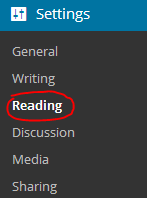
- Go to Settings from the left pane and choose Reading. (As shown in the above image) (ie.https://munnamark.wordpress.com/wp-admin/options-reading.php)
- Now you will get the Reading Settings page.
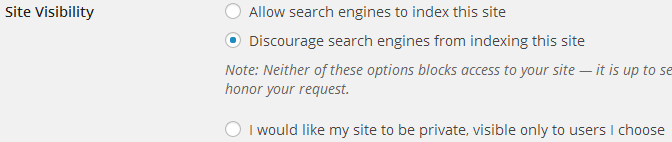
- Move to the Site Visibility section. There you will get three choices.
- The first choice is the default option. It allows search engines to index your site.
- The second choice forbid search engines to index your site.
- And the third option makes your site private. That means only invited persons will be able to access your site.
- Choose any of the three options that is suitable for you.
Note: You can change the settings at any time.
Adding Users in a Private Site
If you make your site private, then you have to manually invite members to your site. Only invited members is capable of viewing your contents or writing posts in your site. To invite users, follow the steps below:
- Go to your WordPress control Panel
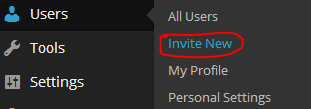
- Choose Users > Invite New (As shown in the above image) (ie. yoursite/wp-admin/users.php?page=wpcom-invite-users)
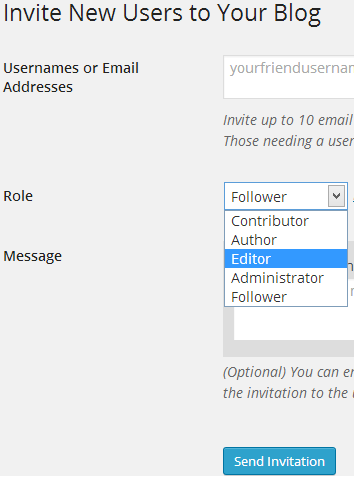
- Now you will get the invite users form. Type username or their emails. Choose one of the five roles (Contributor/ Author/ Editor/ Administrator/ Follower) for the invited members.
- Type an invitation message if necessary
- Finally hit on the Send Invitation button.
Then the invited user will get an email. If he accepts the invitation, you can view the member in the past invitation section. From there you can manage your members.
Hope youve clearly understand the topic. If you have any confusion, dont hesitate to leave a comment. :)
Get more tips on Blogging . . .
Stay with Marks PC Solution to get more interesting IT topics!
Friday, October 24, 2014
Type Bengali with Avro Keyboard
In Bangladesh the most used software for Bangla typing is Bijoy. But this is not a free software. So most of the users use the pirated version of Bijoy and certainly this is against law. And Bijoy 2003 doesnt work with the Windows Vista, 7 or 8.
But there is a alternative software. And day by day it is being popular for Bangla typing. Ya, I am talking about Avro Keyboard.

- Freeware (Open Source)
- Small in size (10/11 MB)
- Only F12 can be used to switc between Bangla & English
- Unicode Fonts
- Different keyboard layouts
- Useful to write in the web
- Phonetic keyboard (English to Bangla)
- Bangla Spell Checker
- Fast and reliable
- Portable Version is also available
Download Link: http://www.omicronlab.com/
Download Customized Version (Portable)
Thursday, October 23, 2014
Printer Pro For Allows You To Print From Your iOS Device

 Printer Pro for iPhone, iPod Touch and iPad allows you to print to most printers from your iOS devices. Click here for the iPad app and here for the iPhone and iPod Touch app. Printer Pro is not a universal app so you will need to buy the app separately for your iPhone and iPad in order to have the best experience. Printer Pro allows you to print to most Wi-Fi printer and any printer attached to your computer by downloading a desktop app. To test to make sure your printer is compatible you can download Printer Pro Lite by clicking here. Setting up is relatively quick and easy. Once you set up your printer the app will remember your printer and you will not need to set it up each time. Printer Pro allows you to print email attachments, files from Dropbox, Web pages, Photos and Contacts. Click read more below to see screen shots of Printer Pro.


This app was provided complimentary to the reviewer.
Subscribe to:
Posts (Atom)